The shopping list
The shopping list is built automatically from everything planned on the calendar for the next 4 weeks, combining ingredients across recipes and participants. You can also add items to it by hand — for something you need that isn’t tied to a planned recipe.
Manually added items
A manually added item doesn’t need a specific date. It simply stays on the list, grouped separately from the day-by-day recipe items, until either you check it off or about 4 weeks pass — short-lived items you add and forget about won’t linger on the list forever.
If you’d rather manage exact dates for manual items too, turn on Use dates in your settings.
Checking items off
Tap an item to check it off. Checked items are hidden from the list by default — see Keep items below if you’d rather they stay visible, struck through.
Filters
Open Filters to adjust how the list is shown. These are saved to your account, so they carry over across devices and sessions:
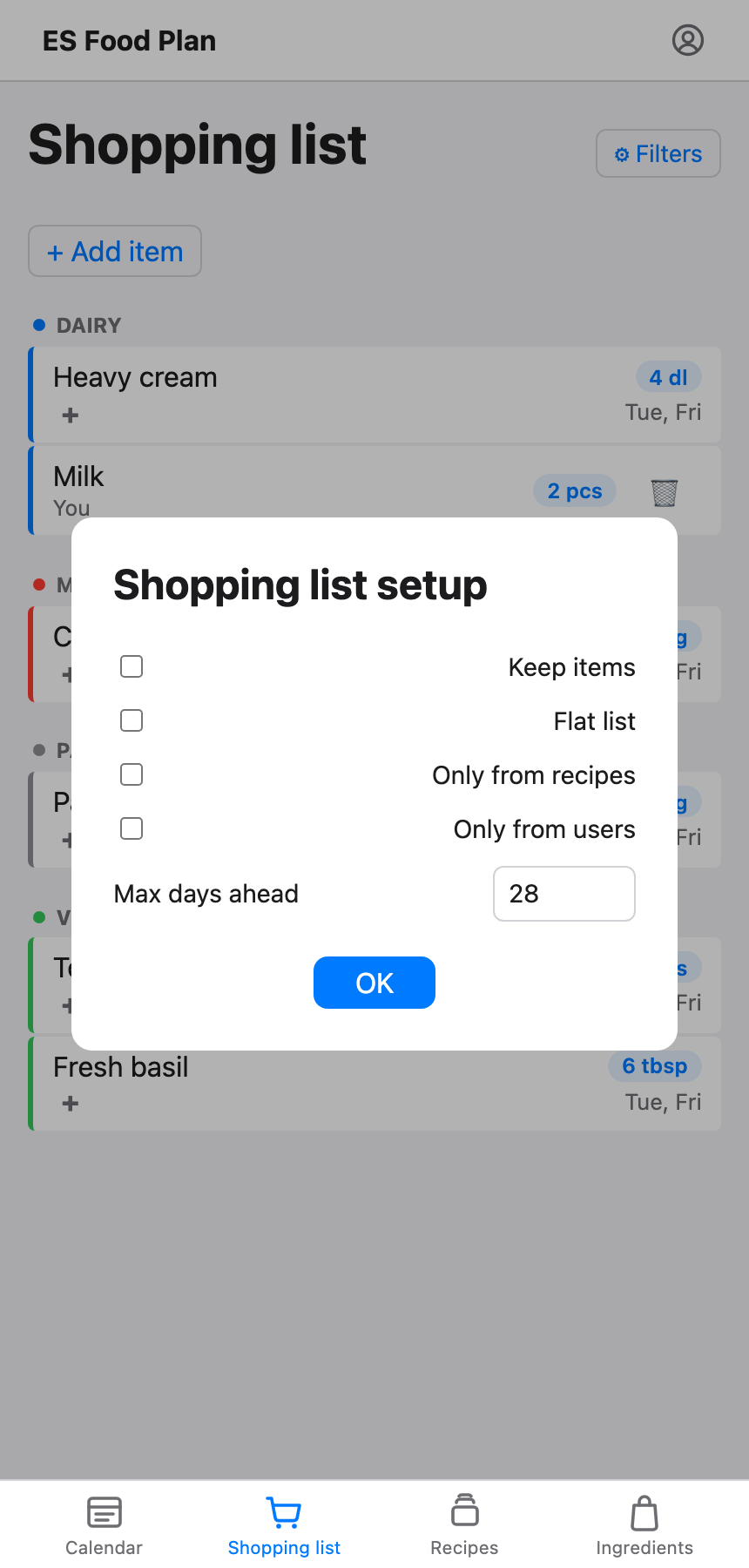
- Keep items — keep checked-off items visible instead of hiding them.
- Flat list — show every entry on its own line, instead of the default of merging entries for the same ingredient (from different days or recipes) into a single combined line.
- Only from recipes — hide manually added items, showing only what came from planned recipes.
- Only from users — the opposite: hide recipe-driven items, showing only manually added ones.
- Max days ahead — how far into the calendar’s 4-week window to pull recipe-driven items from. Manually added items aren’t affected by this — they stay on the list regardless. Lowering this is handy if you only want to see what’s needed for the next few days.